Someone was helping a family member who uses a screen reader (special software that reads website content aloud for people with visual impairments) browse a few websites for a school project. Every single time they opened a new page on one particular website, the same long menu was read out loud from the very beginning — "Home, About, Services, Blog, Contact, Careers..." — before ever reaching the actual page content they needed.
After the fourth page in a row, the frustration was obvious. It wasn't that the website was broken. It was simply built without a small, quiet feature that most visitors never even notice exists — because they don't need it.
Let's understand what it really means.
What Is a Skip Navigation Link?
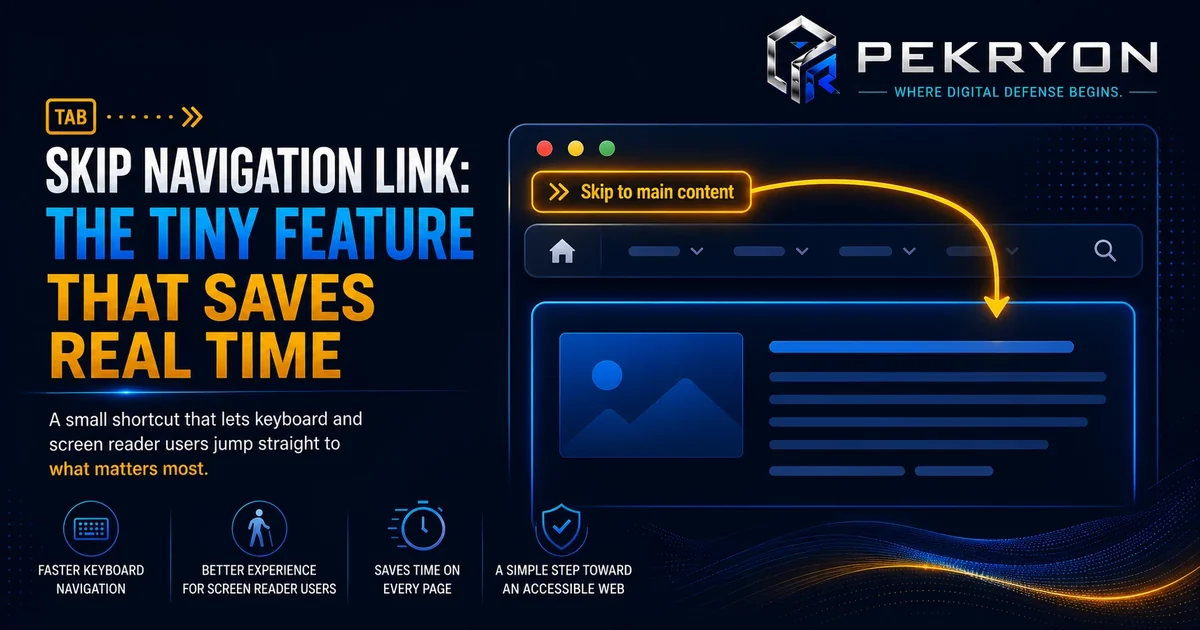
A skip navigation link (often labelled "Skip to main content") is a small, usually hidden link placed right at the very top of a webpage, before the main menu. When used, it lets visitors jump straight past the repeated navigation menu and land directly on the actual content of that page.
Think of it like a "skip intro" button on a video. If you've already seen the introduction many times before, you don't want to sit through it again on every single video — you just want to jump straight to the part that matters this time. A skip navigation link does exactly this, but for a website's repeated menu instead of a video intro.
For most visitors browsing with a mouse, this link is often invisible or barely noticeable, since they can simply glance past the menu. But for visitors using screen readers or navigating only with a keyboard, skipping past a repeated menu isn't automatic — without this link, they must listen through or tab through the entire menu, every single time.
Why Should You Care About This?
- Screen reader users — without it, they must listen to the entire menu read aloud before reaching the actual content, on every page they visit.
- Keyboard-only users — some visitors navigate entirely using a keyboard, pressing "tab" repeatedly instead of using a mouse. Without a skip link, they must tab through every single menu item first.
- Time and patience — repeatedly sitting through the same navigation, page after page, is genuinely tiring and can lead visitors to give up entirely, even if your content is exactly what they needed.
- Accessibility standards — a skip navigation link is a well-recognised, expected feature in accessibility guidelines, and its absence is one of the more commonly flagged gaps during accessibility reviews.
Where Do You See This in Daily Life?
- Pressing "tab" right after a page loads and briefly seeing a small "Skip to main content" button appear
- A screen reader announcing "Skip to main content, link" as the very first thing read on a page
- Noticing that some well-built websites feel noticeably quicker to navigate with a keyboard alone
How Does It Actually Work?
A skip navigation link is usually placed as the very first interactive element in a webpage's code, even before the main menu. It's often visually hidden by default, since most visitors using a mouse don't need to see it — but it becomes visible the moment someone navigates using a keyboard and reaches it using the "tab" key, or is announced aloud immediately by a screen reader.
Here's an important nuance worth understanding clearly: hiding the link visually is not the same as hiding it from assistive technology. Some beginners assume a "hidden" link means it's been removed entirely from accessibility tools too, but a properly built skip link remains fully available to screen readers and keyboard navigation, even while staying invisible to typical mouse users until it's specifically needed. This distinction matters, because a skip link that is accidentally hidden from everyone, including assistive technology, provides no benefit at all.
Common Examples
- A website includes a properly hidden skip link that appears the moment a keyboard user presses "tab," letting them jump straight into the main content instantly.
- A website attempts to add a skip link but hides it using a method that also blocks it from screen readers, making it technically present in the code but practically useless.
- A website with no skip link at all forces every keyboard or screen reader user to go through the full menu, on every single page.
Benefits of Adding a Skip Navigation Link
- Saves real time and effort for visitors using screen readers or keyboard-only navigation
- Reduces frustration that could otherwise lead visitors to leave your website early
- Aligns your website with recognised accessibility guidelines
- Reflects thoughtful, considerate website building that benefits specific visitors significantly
Risks or Limitations to Understand
- A skip link alone does not make a website fully accessible — it addresses one specific, important pain point
- If hidden incorrectly, a skip link can end up invisible to both regular visitors and assistive technology, providing no real benefit
- This feature specifically helps with repeated navigation menus — it doesn't address unrelated issues like heading structure
- Adding a skip link to a very short page with a tiny menu is less critical, though it remains a reliable, low-effort best practice regardless
Common Mistakes Beginners Make
- Assuming a hidden skip link is unnecessary, without realising who specifically depends on it
- Hiding the link using a method that also removes it from screen readers, defeating its entire purpose
- Believing a skip link is only useful for large, complex websites
- Not testing the feature with a keyboard or screen reader, so a broken or missing skip link goes unnoticed
Beginner Tips
- Add a "Skip to main content" link as the very first element on your pages, before your main navigation menu.
- Hide it visually but keep it accessible to screen readers and keyboard navigation, rather than removing it from the page entirely.
- Test it yourself by loading a page and pressing "tab" once, to confirm the skip link appears and works as expected.
- Don't assume it's only for large websites — even smaller sites with a modest menu benefit from this simple addition.
- Review this alongside other accessibility basics periodically.
Manual Check Guide: How to Check This Yourself
- Open any page on your website in a browser.
- Click once anywhere on the page background (not inside a text box or link) to make sure the page itself has focus.
- Press the "Tab" key on your keyboard once.
- Watch the very top-left corner of the page closely — a small button or link, often reading "Skip to main content" or similar, should briefly appear.
- If it appears, press "Enter" to confirm it works and jumps you further down the page, past the menu.
- If nothing appears at all after pressing "Tab," your website likely doesn't have a skip navigation link in place.
This check takes only a few seconds and can be repeated on any website, including your own.
Frequently Asked Questions
1. What is a skip navigation link? It's a small link placed at the very top of a webpage that lets visitors jump directly past the repeated menu and land straight on the main content.
2. Who actually uses skip navigation links? Mainly visitors using screen readers or keyboard-only navigation, who would otherwise need to listen to or tab through the entire menu on every page.
3. Why is the link often invisible to regular visitors? Because most visitors using a mouse can simply glance past the menu, so the link is typically hidden visually and only appears or is announced when specifically needed.
4. Can hiding a skip link cause problems? Yes, if it's hidden using a method that also removes it from screen readers and keyboard access, since that defeats the entire purpose of having it.
5. Do small websites with simple menus need a skip link too? It's still a good, low-effort practice even for smaller sites, since any repeated menu creates some amount of friction for visitors relying on assistive technology.
6. Does a skip link fix all accessibility issues on my website? No. It solves one specific, important pain point around repeated navigation — broader accessibility depends on several other factors as well.
7. How can I check if my website has a working skip link? You can test it yourself by pressing "tab" right after a page loads and watching for a link to appear near the top of the page.
8. Is adding a skip navigation link difficult to implement? Generally no. It's a well-documented, common accessibility feature that most website platforms and developers can add with relatively little effort.
Conclusion
The story of listening to the same menu again and again shows how a tiny, often invisible feature like a skip navigation link can make a real, meaningful difference for visitors who depend on it, even if most people browsing your site never notice it's there.
It's a simple, well-understood fix. A quick test with your keyboard, and a properly hidden but accessible skip link, can genuinely improve how welcoming and efficient your website feels for everyone.
If you'd like to check whether your own website has this in place, you can run a quick, free check at pekryon.com and review this along with other technical details about your site.