Imagine someone runs a small online store. One day, a customer calls to say their credit card got misused shortly after shopping on the store's website. The store owner is confused — nothing looks wrong. The website loads fine. No warning messages. No broken pages.
But somewhere, hidden inside one of the website's pages, a tiny bit of code that doesn't belong there has been quietly running in the background, collecting information from every visitor who checks out.
The website wasn't "hacked" in the dramatic way people imagine. No one broke down a digital door. A small script simply slipped in — through a comment box, an old plugin, or a compromised ad script — and the website had no way of stopping it from doing whatever it wanted.
This is the exact problem that Content-Security-Policy, or CSP, is designed to prevent.
Let's understand what it really means.
What is CSP?
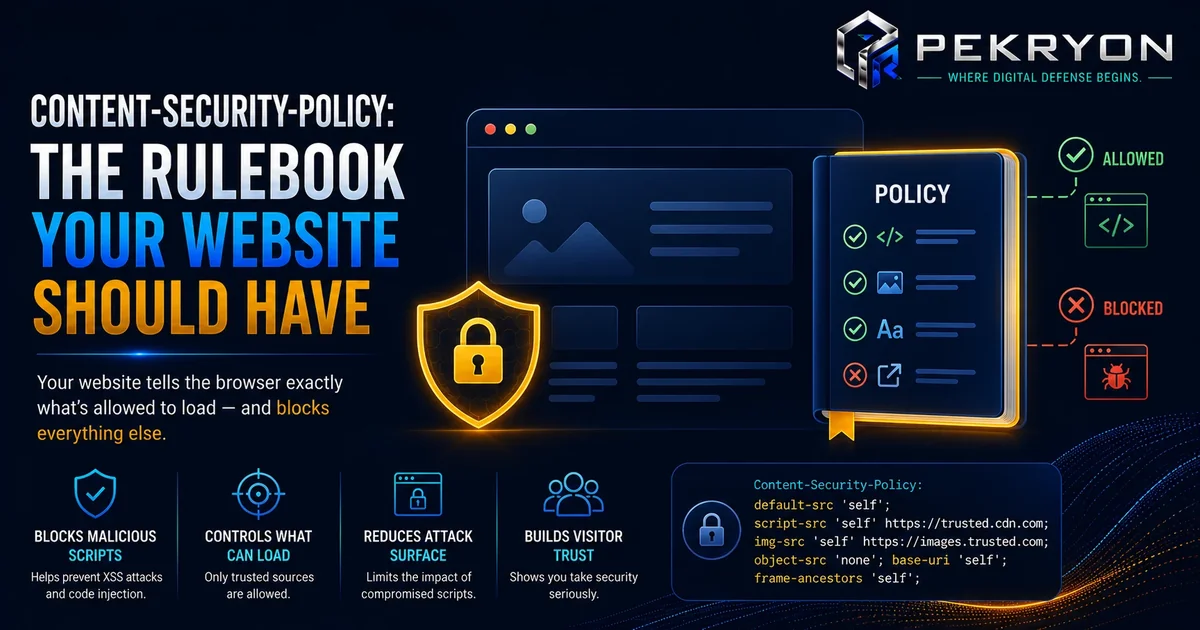
Content-Security-Policy (CSP) is a set of rules a website gives to your browser, telling it exactly which sources of content are allowed to run or load on that page — and which ones should be blocked.
Think of it like a guest list at a private event. Without a guest list, anyone can walk in and do whatever they like once inside. With a guest list, only approved people (or in this case, approved scripts, images, and other resources) are allowed through the door. Everyone else is turned away, no questions asked.
A website's CSP rule might say things like: "Only run JavaScript that comes from my own domain," or "Only load images from these specific approved sources." If something outside that list tries to run, the browser simply refuses to let it.
Why should you care?
Websites today are rarely built from scratch by one person. They pull in code from many places — plugins, ad networks, analytics tools, embedded videos, chat widgets, and more. Each of these is a potential entry point for unwanted code.
The most common risk CSP protects against is called Cross-Site Scripting, often shortened to XSS. This happens when an attacker manages to sneak a malicious script into a webpage — often through something as simple as a comment field or contact form that isn't properly checked — and that script then runs inside the browser of anyone who visits the page.
Without CSP, a browser has no way of knowing that script shouldn't be there. It just runs it, along with everything else. With CSP in place, even if a malicious script somehow gets injected into a page, the browser checks it against the approved list — and refuses to run it, because it doesn't come from a permitted source.
Where do you see it in daily life?
Like most security settings, CSP works silently, but it affects you constantly:
- Every time you enter a password on a website with a login form
- Every time you shop online and enter payment details
- Every time you use a website with comment sections, forums, or user-submitted content
- Every time you browse a site that includes ads, embedded videos, or third-party widgets
Well-built websites — banks, large e-commerce platforms, and modern web applications — almost always have some form of CSP in place, even though it's completely invisible to the average visitor.
How does it work?
A website sends its CSP rules as a special instruction, called a header, along with each webpage. This header lists out approved sources for different types of content — scripts, images, fonts, videos, and so on.
When your browser loads the page, it reads this header first. From that point on, if the page tries to load or run anything from a source that isn't on the approved list, the browser blocks it immediately — before it can do anything at all.
For example, a CSP rule might say: "Only allow JavaScript from this website's own domain, plus this one trusted analytics provider." If a hidden malicious script tries to run from a random, unapproved source, the browser stops it in its tracks.
Common examples
Common things a CSP rule usually controls include:
- Where JavaScript is allowed to load from
- Where images and fonts are allowed to load from
- Whether the page can be displayed inside another website's frame (which helps prevent a different trick called clickjacking)
- Which domains are trusted enough to run code on the page at all
Benefits
- Blocks unauthorized scripts — even if malicious code gets injected somewhere on the site, it usually won't be allowed to run
- Reduces damage from third-party tools — if an ad network or plugin gets compromised, CSP limits what it can do on your site
- Builds visitor trust — a strong CSP is a recognized sign of a well-maintained, security-conscious website
- Works quietly in the background — once set up correctly, it needs very little day-to-day attention
Risks or limitations
Here's an important nuance beginners should know: CSP is powerful, but it's not automatic protection against everything. It's only as good as the rules a website sets up. A CSP rule that's too loose — for example, one that allows scripts from "any source" just to avoid breaking something — offers very little real protection, even though it's technically "enabled."
There's also a well-known exception worth mentioning: some older websites use a setting called unsafe-inline, which allows scripts to run directly inside the page without the usual restrictions. This is sometimes used because rewriting old code is hard, but it significantly weakens CSP's protection. A website with CSP enabled but heavily relying on unsafe-inline is not as protected as one might assume just because "CSP is turned on."
Common mistakes beginners make
- Assuming that simply having any CSP header means the site is fully protected, without checking how strict the rules actually are
- Setting overly broad rules (like allowing all sources) just to avoid troubleshooting broken features
- Forgetting to update CSP rules after adding new third-party tools, plugins, or ad scripts to the site
- Not testing the website after applying CSP, which can sometimes accidentally block legitimate content too
Tips or best practices
- If you manage a website, ask your developer whether a CSP header is configured, and how strict it is
- Start with a stricter policy and only loosen it for tools that genuinely need it, rather than starting loose and never tightening it
- Review your CSP settings whenever you add a new plugin, widget, or third-party script to your site
- If you're unsure whether your website has CSP set up at all, the scanner at pekryon.com can check this for you in a few seconds