Imagine you're curious about who's behind a website you just discovered. You look up its public registration details, expecting a name and address. Instead, you see something like "Privacy Protected" or "Redacted for Privacy."
Is that a red flag? Or is it just... normal?
Let's understand what it really means.
What is WHOIS privacy?
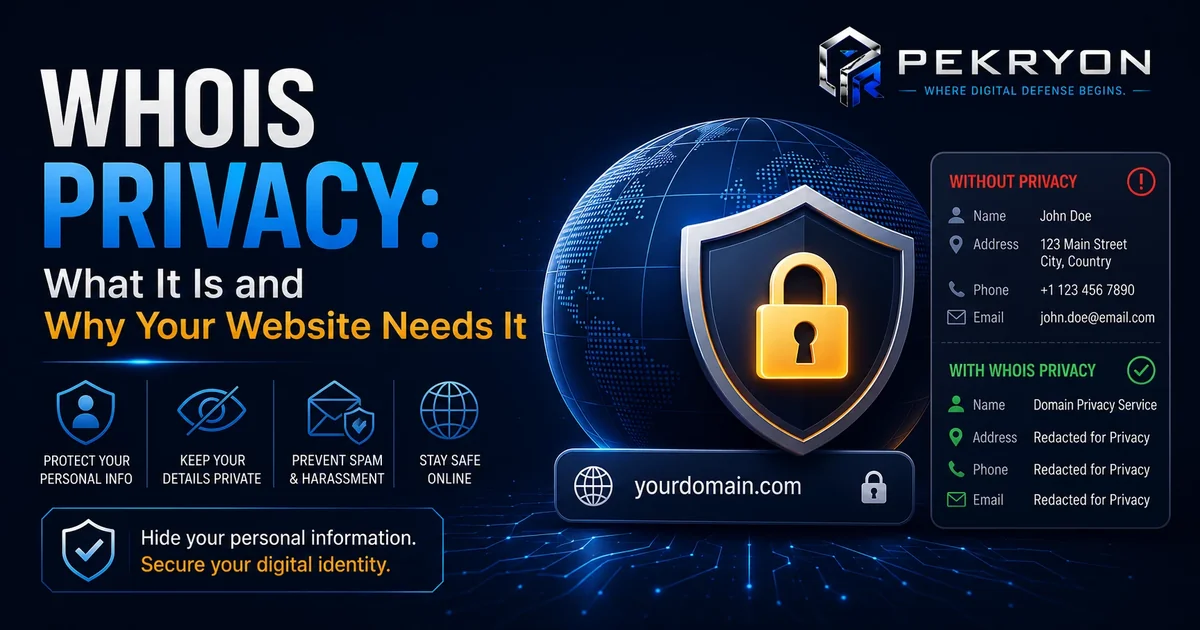
Every domain name registration includes public details about who registered it — normally the owner's name, email, phone number, and sometimes address. This public record is called WHOIS. It exists so anyone can look up basic information about who's responsible for a domain.
WHOIS privacy (also called domain privacy protection) is a service that replaces those personal details with generic placeholder information, like a privacy company's contact details, instead of the actual owner's. The real details still exist behind the scenes with the registrar, but they're hidden from public lookups.
Think of it like an unlisted phone number. The number still works and belongs to someone specific, but it's simply not visible in the public directory.
Why should you care?
If you're evaluating a website — as a customer, business partner, or just a curious visitor — knowing what WHOIS privacy does and doesn't mean helps you judge fairly instead of jumping to conclusions. If you own a website yourself, understanding this helps you decide whether hiding or showing your own registration details makes sense for your situation.
Where do you see it in daily life?
- Looking up a website's WHOIS record and seeing a privacy service's details instead of a real name
- Domain registrars offering "privacy protection" as an add-on, sometimes even free, when you buy a domain
- Business directories or "verified seller" badges that require real ownership details to be shown, separate from WHOIS
- News articles investigating a suspicious website and noting that its owner details are hidden
How does it work?
When someone registers a domain, they can usually choose to add a privacy protection service, often provided by the registrar itself or a third party. This service essentially "swaps in" its own contact information into the public WHOIS record, while keeping the real registrant's details on file privately for legal purposes, like responding to valid legal requests.
This became especially common after privacy laws in various countries began requiring stronger protection of personal data, making many registrars offer WHOIS privacy by default rather than as an optional extra.
Common examples
- A small personal blog owner using WHOIS privacy simply to avoid unwanted spam calls and emails
- A legitimate business using WHOIS privacy to prevent competitors from easily identifying and contacting their domain registration details
- A scam website using WHOIS privacy specifically to make it harder to trace who's actually behind it
- A government or educational website that doesn't use WHOIS privacy at all, since its registration is already tied to a verified, public organization
Benefits
WHOIS privacy protects everyday website owners — especially individuals and small businesses — from spam, unwanted marketing calls, and even harassment or stalking, since a home address and phone number would otherwise be fully public. It's a genuinely reasonable, widely used privacy feature, not something reserved for people with something to hide.
Risks or limitations
Here's the important nuance: WHOIS privacy being turned on tells you almost nothing on its own, either way.
A well-known exception worth remembering: the overwhelming majority of legitimate websites today use WHOIS privacy, simply because most registrars now offer it by default and most owners reasonably want to protect their personal details. So seeing "Privacy Protected" is not, by itself, a meaningful warning sign anymore.
That said, there is a genuine pattern worth knowing: scam and phishing websites disproportionately rely on hidden ownership too, since it makes tracing them slower. The honest takeaway is that WHOIS privacy is common among both trustworthy and untrustworthy sites, so it should never be judged in isolation.
| Situation | What it tells you |
|---|---|
| WHOIS privacy enabled, otherwise normal-looking site | Very common and not meaningful on its own |
| WHOIS privacy enabled, combined with other red flags (poor grammar, urgent payment requests, mismatched branding) | Worth extra caution — look at the full picture together |
| WHOIS privacy disabled, real registrant details shown | Can add some transparency, but doesn't guarantee legitimacy either |
| Certain regulated domains (like .gov or verified business directories) | Ownership is confirmed through separate verification, not WHOIS visibility |
Common mistakes beginners make
- Assuming any website with hidden WHOIS details must be suspicious
- Assuming a website showing full owner details is automatically trustworthy
- Not realizing that privacy laws in many regions now make hidden WHOIS details the normal default, not the exception
- Treating WHOIS privacy as the single deciding factor instead of one small piece of a bigger picture
Tips or best practices
- Never judge a website purely based on whether its WHOIS details are hidden or shown
- Look at WHOIS privacy alongside other signals — how the site was shared with you, whether it uses a secure connection, and whether its content matches what it claims to offer
- If you're a website owner, consider WHOIS privacy a reasonable, common choice for protecting your personal information
- If something else about a site already feels off, hidden ownership is a reasonable extra reason to pause and verify further before trusting it
If you're ever curious about your own website's public registration visibility and other trust signals, the scanner at pekryon.com can help you check this as part of a wider website report.